Taka Live Agency Registration

Taka Live Agent Registration

Take Live inviting agents to go onboard to experience their amazing feature of Live Streaming, Audio chat, Party Rooms & games. Taka offer 70% gift sharing to its hosts and up-to 20% commission to their Agencies. Through Taka’s multiple withdrawal methods users can transfer amount anytime by themselves. There is a lot more to explore about Taka Live agency benefits in this article, register now to claim your super offering bonus.


Become Taka App Agency

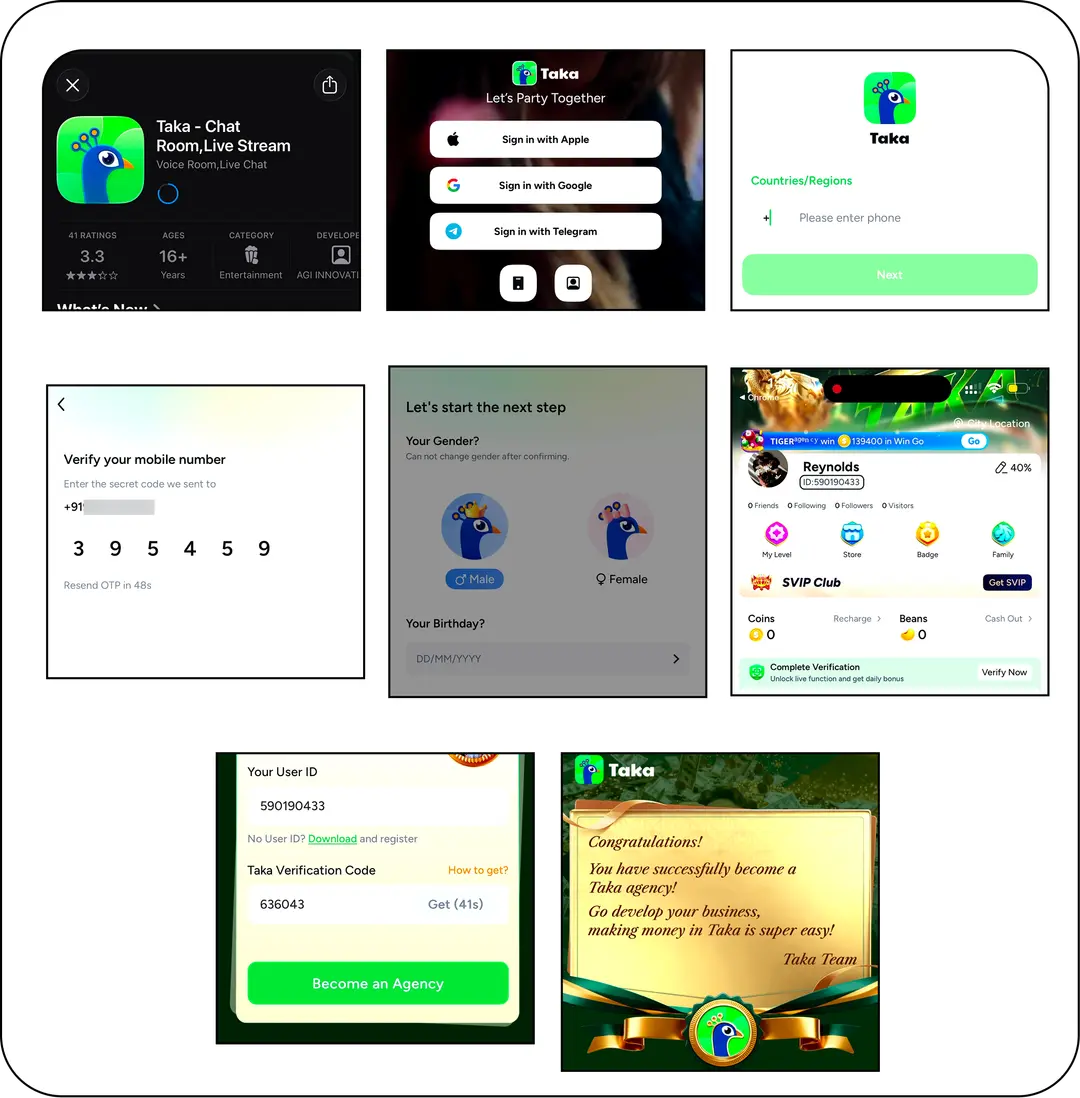
  • Download the Taka Live App.
  • Sign up with your mobile number or Email ID.
  • Enter your mobile number, click “Next”, and submit the verification code.
  • Select your preferred language, gender, and date of birth.
  • Go to your profile section and copy your Taka ID.
  • Click on the Agency registration link.
  • Enter your Taka ID and click on “Get”.
  • Enter the received verification code from your app message section.
  • Click on “Become an Agency”

You have successfully registered as a Taka Live Agent.

SUBMIT THE FORM IF YOU ALREADY HAVE TAKA ACCOUNT

Taka Agency Commission

AGENT COMMISSION FROM GIFTS:

AGENCY COMMISSION RATIO IS CALCULATED IN 2 PARTS ON TAKA APP:
  1. Hosts Earning commission from your agency in past 30 days
  2. Invited agent’s host earning commission in past 30 days

For Example: 
Your own agency income is 25 million beans in past 30 days.
Accumulated earning on your invited agents in past 30 days is 80 million beans.
Overall, your agency earning is 105 million beans and agency commission will be 20%.

COMMISSION CALCULATION

Commission calculation from own agency host:
Formulae: 20% x 25 million = 5 million = commission amount.

Commission calculation from invited agents:
Formulae: (Your agency commission rate – individual invited agency commission rate) x income of individual invited agent

For Example:

  • Your Agency current commission rate is 20%.
  • Invited Agent C current commission rate is 4%.
    Invited Agent D current commission rate is 12%.
  • Your Income from Agent C (20%-4%) = 16% x Agent C’s Host Gift Receiving.
  • Your Income from Agent D (20%-12%) = 8% x Agent D’s Host Gift Receiving


LevelBasic Income (Beans)Commission Rate
A100M+20%
B30M – 100M16%
C5M – 30M12%
D1M – 5M8%
E0 – 1M4%

AGENCY BONUS GIFT COMMISSION

Agents can get bonus gift commission only if they receive enough gifts on self agency account in recent 7 days.
Bonus gift percent will increase upto 15% with the amount of gifts received in past 7 days.

Task Requirement (Gifts income in last 7 days – Beans)Reward Rate
More than 10,000,000 Beans15% of gifts income
More than 3,000,000 Beans10% of gifts income
More than 300,000 Beans5% of gifts income

AGENCY LEVEL BONUS

Agency level bonus can also increase by adding more active female hosts and increasing female host’s earning, Agent will get first-time upgrade rewards and exclusive raning rewards, you can find more detailed information in agency dashboard.

Agents can also raise the agency level by increasing the number of valid female hosts and female hosts’ income, then get the first-time upgrade rewards and exclusive ranking rewards.

How To Withdraw Amount in Taka

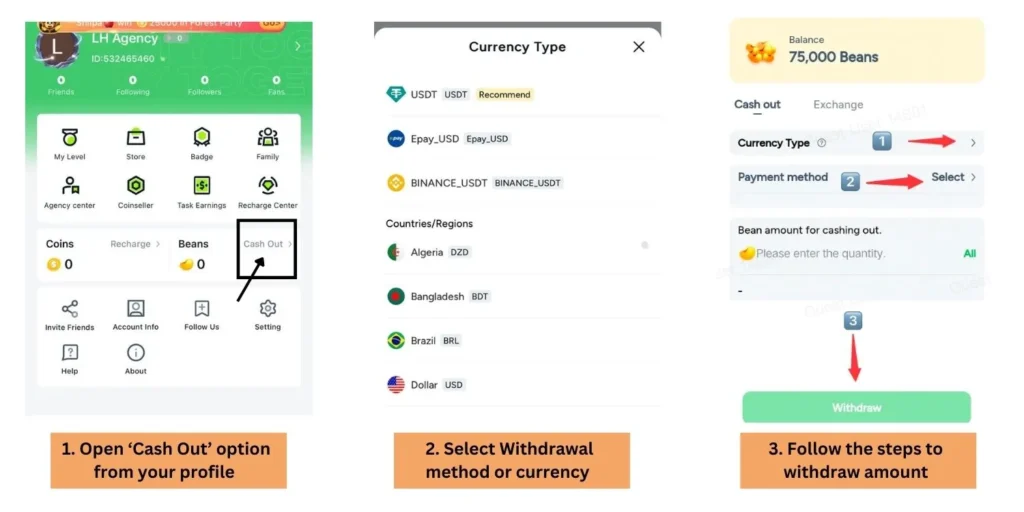
Taka Live offer multiple currency withdraw through different payment methods.

  1. Select ‘Cash Out’ option from profile.
  2. Choose your currency or preferred payment method.
  3. Tap ‘Withdraw’ button
  4. Enter your account details.
  5. Enter amount and submit.

How to Add Hosts

Taka has 2 methods to add hosts in your agency. After joining agency every host need to complete face verification to activate live streaming function.

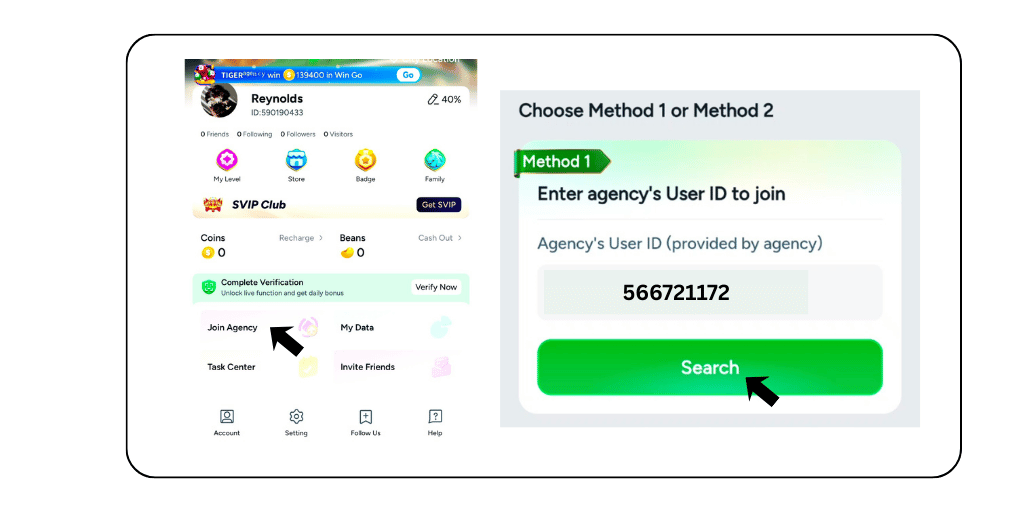
METHOD 1

  • Ask your joining host to go to the profile section.
  • Click on “Join Agency” and enter the Agency’s ID. (To join LH Agency, enter: 566721172)

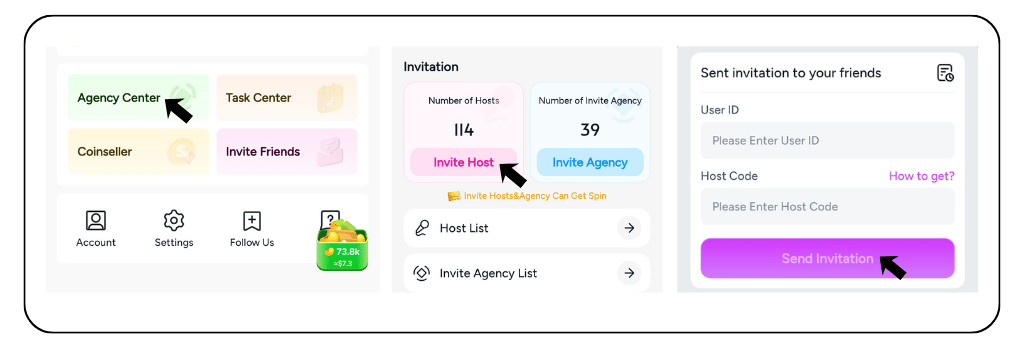
METHOD 2

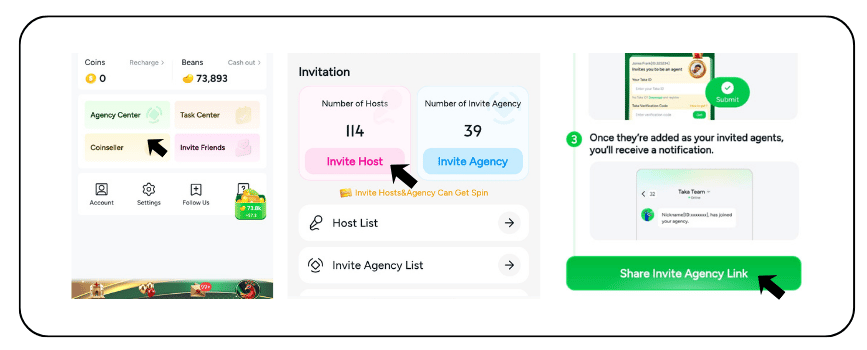
  • Go to your profile section and click on “Agency center”.
  • Tap on “Invite Host”.
  • Enter the User ID and Host Code, shared by the user.
  • The user will get the invitation in the profile section and accept it to join the agency

How To Invite Agents

  1. Go to ‘Agency Center’ from profile.
  2. Select ‘Invite Agency’ from dashboard.
  3. Copy invite link and share with your sub-agent.
  4. Sub-agent will Download Taka app & Create Account.
  5. Agent has to create Agency name, enter Mobile Number & Accept agency invite.